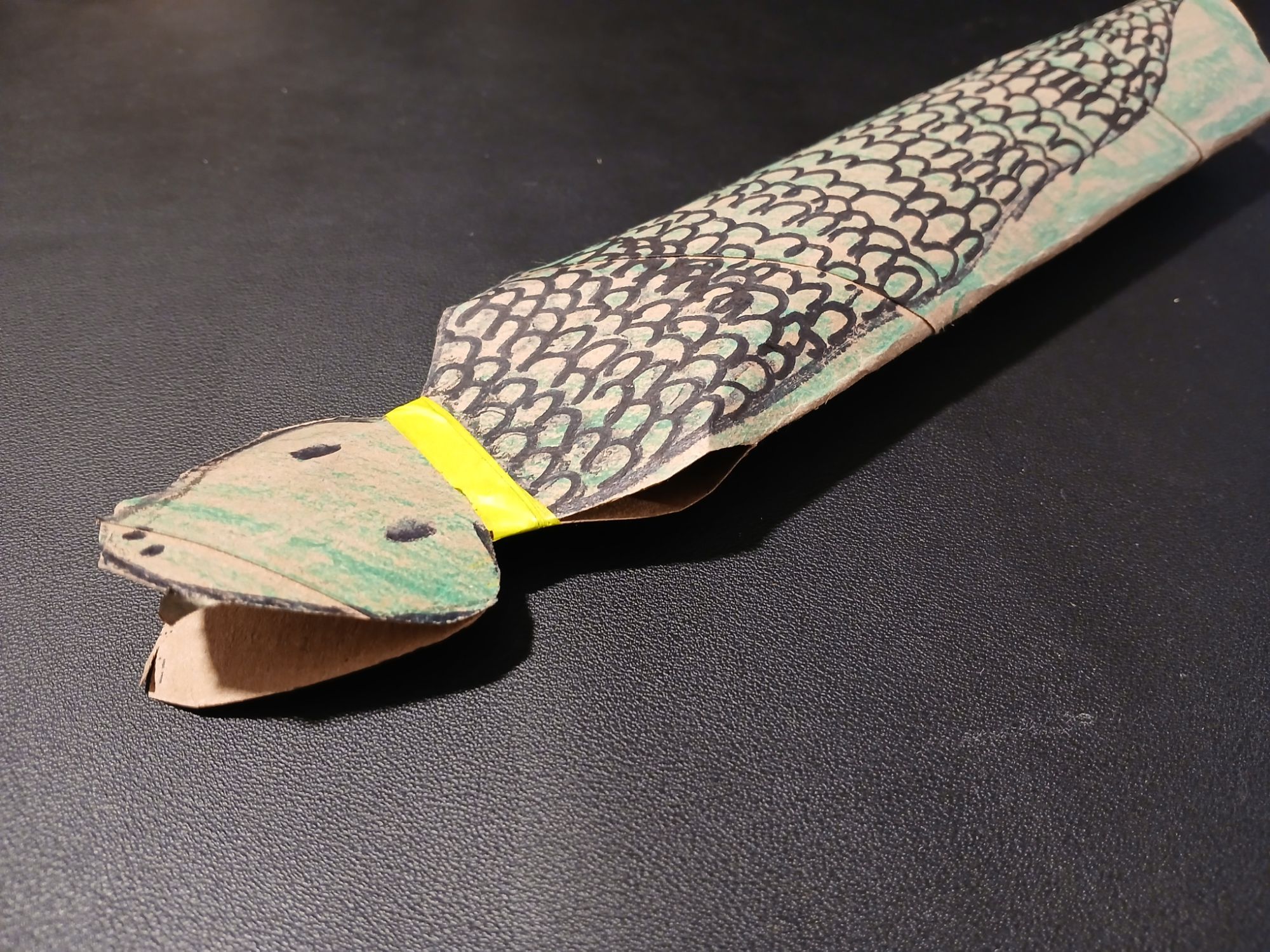
He wanted snakes. So we started discussing the materials we had on hand and what he envisioned. We landed on making snakes out of paper-towel rolls.
As he chattered in the backseat, I let my mind wander to how I would engineer a snake from a paper towel roll. In theory, they were similar shapes, both long cylinders. It was the issue of movement I was trying to solve.
Snakes slither in a motion that requires flexibility. So, rather than a solid cylinder that spans the full length of the “snake”, a set of linked smaller cylinders would be the better option.
But how to produce that shape from a paper-towel roll?
Photo by Jessica Lewis ud83eudd8b thepaintedsquare on Pexels.com
I thought my solution was pretty ingenious. I folded a crease into the top of the roll, and used double-sided sticky tape to create a “spine”. Then, I made vertical cuts along the bottom to allow for movement as the snake “slithered”.
The problem? The more time I spent folding, cutting, and taping–the more distressed the mini-client became.
I tried to reassure him how cool it would be. I explained I was making it “move like a snake”. All of my explanations did nothing to assure the mini-client what I was doing was the right way to make a snake.
Why?
Because it wasn’t what he wanted.
When I finally stopped to ask him what he thought it should look like, it was simply a snake drawn on a cardboard roll. And the mouth should open.
🤦♀️ 😅 😂
This was a reminder that as creatives, engineers, and ideas-people, it is so easy to get carried away with how cool we can make it. It’s important not to skip over checking with the client to ensure we are building what they want.
I was building the mini-client a web app. He wanted a static page with a gif.
The brief
The PR
Eventually, we got on the same page and I was able to deliver a product the mini-client was happy with. However, I wasted time and materials in pursuit of my own goals. That is never ideal.
I’m thankful for the reminder to invest time in asking better questions earlier in the creative process to meet client expectations.
I have to admit, this will be a hard switch from PHP. When I create arrays in PHP, generally, I try to be as explicit as possible by using associative arrays so I can pull the information I want back out:
It doesn’t appear that Go has this option. If I wanted to create the same array in Go, it would look like this:
package main
import ("fmt")

func main() {
  var new_array = [3]string{'Jane','Red','Apple'}

  fmt.Println(new_array)
}
Coming from a PHP perspective, this seems complicated because it means that I have to remember the order in which I input information to get the correct data out. This is a hassel. In PHP, I just have to remember that if I want a name, I would fetch $new_array['name']. In Go, this would have to be new_array[1] which isn’t as explicit.
However, I think the reason behind this limitation is, in itself, a concept switch about how to use arrays. In PHP, arrays are a veritable Mary Poppins bag which can handle multiple data types, be deeply nested, and have items added or removed without consequence (until you need it). However, this can be a trap. If you haven’t thought through the structure of your data (for example, by creating a class object), it can be tempting to just throw everything in your array-bag. Longterm, this can cause your code to spaghetti out of control and be a performance pain.
Go seems to seek to avoid this trap by requiring that all items in an array be of the same data type. There is also a built in method to control how many items should be placed within an array. In this way, arrays seems to be more like glass recycling bins in Germany.
The bins only take one type of material, glass, it is sorted by color, and you can see when the bin is full. It doesn’t matter as much what order things are in because you know everything in the “brown glass” bin is a type of brown glass.
package main
import ("fmt")

func main() {
  var zipcodes = [3]int{ 10011, 90210, 20001 }
  var colors = [3]string{ 'red', 'blue', 'green' }
  var fruits = [3]string{ 'apples', 'oranges', 'cherries' }

  fmt.Println(zipcodes)
  fmt.Println(colors)
  fmt.Println(fruits)
}
This is the key point of the concept switch; in PHP arrays can be used as a catch all (even if it isn’t necessarily a good idea) and in Go arrays are used to catch a specific type of data with a grouped theme so you don’t care as much about the order of items. It almost seems like in PHP, it is easier to focus on where you need a collection of data because you can push so much into a single array (e.g. I am going to throw everything in my bag so I have it with me). In Go, a dev is required to think more about what you need since it makes more sense to group themed items together (e.g. I am going to use suitcase cubes to make sure its nice and neat).
PHP Arrays
<?php
// Let's describe Mary Poppins in an array

$mary_poppins = array(
   'height' => 'average',
   'singing' => 'often',
   'bag_items' => array( 'lamp', 'umbrella', 'spoonful of sugar'),
   'cleanliness' => 'strict',
   'hair' => 'brown',
);
?>
GO Arrays
package main
import ("fmt")

func main() {
   // Let's describe Mary Poppins in a series of arrays
  var physical_traits = [2]string{ 'brown hair', 'average height'}
  var talents = [2]string{ 'cleaning', 'singing'}
  var bag_contents = [3]string{ 'lamp', 'umbrella', 'spoonful of sugar'}
}
Now, I don’t want to give the impression there isn’t any structure to Go arrays. It is based on the index of the array (which starts at 0).
For example, let’s say you are running a competition. The competitors have to face off in a way that you know who got last place before you know who got first. Let’s set up an array to store where each competitor placed:
package main
import ("fmt")

var winners_names = [6]string{}

func main() {
  fmt.Println(winners_names)
}
Calling main() would result in printing [ "" "" "" "" "" "" ]. It is an empty array of strings. Now, let’s add a function to update the winners names as we receive them.
package main
import ("fmt")

var winners_names = [6]string{}

func main() {
  fmt.Println(winners_names)
}

func record_winner( place, name) {
   // Remember that indexes start with 0, so 6th place would actually be stored at winners_names[5]
   var index = place - 1
   winners_names[index] = [name]
}
I think this syntax would work (haven’t got to writing functions yet 😅). So, when we found out that the first two competitors won 5th and 6th place, we could call record_winner() to update the winners_name list.
I am by trade and tutelage, a PHP developer. I can also work in JavaScript, TypeScript, and React. The bulk of my work has been done in PHP. As someone pretty heavily entrenched in WordPress ecosystem, this served me well.
However, as I am looking to new horizons, it is becoming apparent to me that I will need to stretch my language skills even further. So let’s start with Go. Please enjoy my ramblings as I learn 🙂
From a PHP perspective, this sounds pretty similar.
Package declaration => PHP Namespaces. It gives the program or file scope or limitations
Import packages -> In PHP, this was done by the use statements. It allowed you to pull in functions from other namespaces, classes, or even just a single function
Funcations => This is pretty self explanatory
Statements and expressions => I am intrigued…
Syntax
In Go, statements are separated by ending a line (hitting the Enter key) or by a semicolon “;“.
Hitting the Enter key adds “;” to the end of the line implicitly (does not show up in the source code).
❓ Does this mean there are hidden semicolons throughout the code, or does the complier read a new line as a semicolon?
The answer seems to be yes, under certain conditions. I guess for now, I will continue to explicitly write out my semicolons to avoid confusion until I am more comfortable working in Go. Also, to avoid causing myself grief when I switch back to other languages.
Comments
Single line comments start with //
Multiline comments are encased in /* {your comment here} */
Creating variables
Use var
Benefit: this allows you to specify the type of the variable (e.g. var test string = "some words";)
This notation can be used within a function or without
Allows for value assignment to be done separately from declaration
Always requires at least a type or value
✅ var test string = "string";
✅ var test string;
✅ var test = "string";
❌ var test;
use :=
This is a new notation to me, I would have easily mixed it up for a logic statement if I had run into it in the wild
Benefit: It is a shorthand and so it may be faster to use
Like Typescript, the compiler infers the type of the variable based on the value
This notation can only be used within a function
Value must always be assigned at declaration
It is not possible to declare a variable without a value using this notation (which makes sense)
❌ test string := "string"; (I think this would set a variable string as "string")
❌ test := null; (null and empty strings both throw an error)
✅ test := "string";
Declaring multiple vatiables
Similar to a mathematical matrix, you can declare multiple variables and values at the same time
So, for example var a, b = 6, "Hello!"; is the same thing as declaring var a = 6; var b = "Hello!";
If you declaring multiple variables at the same time only supports one type
✅ var a, b string = "A", "B";
❌ var a string, b int = “A”, 2;
Go variable naming rules:
A variable name must start with a letter or an underscore character (_)
A variable name cannot start with a digit
A variable name can only contain alpha-numeric characters and underscores (a-z, A-Z, 0-9, and _ )
Variable names are case-sensitive (age, Age and AGE are three different variables)
There is no limit on the length of the variable name
Variable names support camel case, pascal case, and snake case.
Constants
Seems constants work as expected, they should be declare once, are unchangeable and read-only, can be typed or have the type inferred from the value. To make constants easy to identify, they should be written in uppercase letters (e.g. “USER_AGE”, not “userAge”, or “UserAge”, or “user_age”)
Output
Print()
Prints out the value only, can have multiple comma separated arguments passed in (e.g. Print( "Hello", " ", "World");) Reminds me of the Google Sheets function Concatenate.
Println()
Adds whitespace between arguments and new line at the end. So Println( "Hello", "World"); prints out Hello World.
Printf()
Allows integrating the type or value of a variable into a string.
package main;
import ("fmt");

func main() {
   var userName string = "Jane";

   fmt.Printf( "Hello %v!", userName );
   // Prints "Hello Jane!"
   fmt.Printf( "The name %v is a %t", userName, username );
   // Prints "The name Jane is a string"
}
The values are integrated into the string using formatting verbs.
I’m stopping here for today. The next item up in the tutorial are arrays, and they are definitely different than how they work in PHP. I’ll save that for next time.
I have been working on a project where my access rights to the original repo have recently changed. Before, I was able to push directly to the repo. Now, I am pushing changes as an OSS Citizen and making pull requests from a fork.
However, as I was trying to keep things up to date, a rebase from trunk polluted my forked PR with ~260 commits which I didn’t need 🙈
Stackoverflow to the rescue! I found a similar question which suggested running git rebase -i HEAD~n.
When I ran git rebase -i HEAD~270, vi opened the file with the listed commits. That’s when reality hit. I would need to make ~260 edits to change each pick to drop. There had to be a better way.





 Jess Boctor