
I am currently working on a project to convert a list of active purchases from a custom React component to a built in WordPress component, DataViews. The goal of the project is to utilize the built in sorting, filtering, and pagination of DataViews to improve the user experience by making finding specific subscriptions in their account.
GitHub Issue: https://github.com/Automattic/wp-calypso/issues/86616
A big part of this project has been detangling functionality from class components so that the logic could be exported from the original PurchaseItem component to render within the columns of the DataViews table. I went through this process for each of the four columns in these PRs:
- Purchase Management: Convert
Active Upgradesto DataViews Column 1: Sites #101373 - Purchase Management: Active upgrades DataViews Conversion column 2: Product #102630
- Purchases Management:
Active upgradesDataViews Column 3: Status #102666 - Purchases Management: Active upgrades DataViews Column 4: Payment Methods #102514
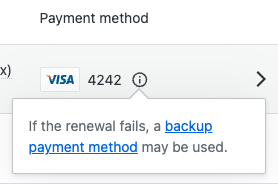
Looks like I missed a notice when rendering the payment method. In the original PurchaseItem component, not only does the payment method type render, but also a notification about if there is a backup payment method.
Production
WIP DataViews
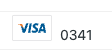
While I was working on the CSS for the DataViews table, I realized that the notice was missing. Exporting the function for the notice and adding it to the payment-methods column wasn’t a problem. However, determining if the component should be rendered threw me a curveball.
The parameter that determines if the component should be rendered is a const isBackupMethodAvailable. However, the value of this const isn’t available within the Purchases.Purchase type. It is actually set and passed to the PurchaseItem component one step higher in the chain, within the PurchasesSite component.
{ purchases.map( ( purchase ) => {
	const isBackupMethodAvailable = cards.some(
		( card ) => card.stored_details_id !== purchase.payment.storedDetailsId && card.is_backup
	);

	return (
		<PurchaseItem
			{... A Bunch of Props...}
			isBackupMethodAvailable={ isBackupMethodAvailable }
		/>
	);
} ) }
At face value, this isn’t a hard fix. I could copy this logic setting isBackupMethodAvailable over to the PurchaseItemRowPaymentMethod component within the DateViews fields. This would allow me to check the two conditions for showing the notice:
- Is the current payment method different from the one being used for the purchase?
- We need the current payment method to be different from the payment method assigned to the purchase. If it isn’t, then the payment method isn’t really a back up–its just the payment method assigned to the purchase. Even if the current payment method is marked to be used as a backup for other purchases, if there isn’t a secondary backup payment method available, then this purchase doesn’t have a backup available.
- Is the card set to be used as a backup payment method?
If these two conditions are true, then there is a valid backup payment method and the notice is shown.
The tricky part is when you start thinking about performance and scale. If a user only has a few purchases and one or two payment methods, then copying this logic over may not be a big issue and the user likely won’t see any drag.
However, if the user has hundreds of purchases and lots of payment methods, this could cause a problem. The DataFields API renders one item at a time. Currently, the payment-method field uses the purchase as the item to render. Since this type doesn’t include the backup payment method information, I can’t just pass it in. So the approach of just copying and pasting this logic over would mean that for every row of the DataViews table, I would need to fetch all of the customer’s payment methods, filter through them to see if there are payment methods which are a backup but not assigned to the purchase, and then repeat it again in the next row.
See how that could get expensive really quickly?
To avoid this performance drain, I have two other options:
- Shove the
isBackupMethodAvailableconst into thePurchases.Purchasetype - Fetch the array of payment methods only once and pass it to
getPurchasesFieldDefinitionsvia the usePurchasesFieldDefinitions hook
I don’t love adding a parameter to a type for a single use case. So I am going with option 2.
The first step is to pass the array of payment methods (StoredPaymentMethod) to the hook from the purchases list index file. This is the closest place where we have this context already available.
// purchases-list-in-dataviews/index.tsx

<PurchasesDataViews
	purchases={ purchases }
	translate={ translate }
	paymentMethods={ this.props.paymentMethodsState.paymentMethods }
/>
We then pass the data from the DataView, to the usePurchasesFieldDefinitions hook, and then finally to the getPurchasesFieldDefinitions function.
// purchases-data-view.tsx

export function PurchasesDataViews( props: {
	purchases: Purchases.Purchase[];
	translate: LocalizeProps[ 'translate' ];
	paymentMethods?: <Array>StoredPaymentMethod;
} ) {
	// ...Other logic...
	const purchasesDataFields = usePurchasesFieldDefinitions( paymentMethods );
	// ...More logic...
}
// use-field-definitions.ts

export function usePurchasesFieldDefinitions( paymentMethods) {
	// Do some stuff with the payment methods
	// Other hook logic
}
Now, remember, there are two conditions for a purchase to be considered as “having a backup payment method”. The first is that the id of the StoredPaymentMethod for the purchase cannot match the backup method, and the second is that the StoredPaymentMethod has to be set to be a backup.
Let’s flip the order in which those items are checked. This way, we can send only the StoredPaymentMethods which are a backup to getPurchasesFieldDefinitions. When each row compares the payment method assigned to that purchase, it will have a smaller scope of payment methods to test against since we have already weeded out any payment methods which aren’t meant to be used as a backup.
const backupPaymentMethods = paymentMethods.filter(
	( paymentMethod ) => paymentMethod.is_backup === true
);
Once we pass that back to getPurchasesFieldDefinitions, we can now render the backup payment method notice by checking if the current purchase’s payment method is the only payment method found in the backupPaymentMethods array.
let isBackupMethodAvailable = false;

if ( backupPaymentMethods ) {
	backupPaymentMethods.filter(
		( paymentMethod ) => item.payment.storedDetailsId !== paymentMethod.stored_details_id
	);

	isBackupMethodAvailable = backupPaymentMethods.length >= 1;
}
Now, we have checked for both conditions and saved ourselves from having to fetch a set of payment methods multiple times.
Thoughts? Comments? Concerns? Have a better way to address the problem? Let me know in the comments.
If you want to see the full work in progress, check out the PR here: https://github.com/Automattic/wp-calypso/pull/102742
 Jess Boctor